

Hello Readers, I hope you’re well.
Welcome to Episode 75 of the UCStatus Podcast. This episode features me (@randychapman), and Shawn Harry (@shawnharry). Mark Vale (@markvale) was driving around Europe collecting printers. So he’s in for credit only.
Another list of stuff from the new quarterly What’s new in Teams blog and other dedicated Teams blogs, the Roadmap and Message Centre from 9th September 2026 to 26th October 2026. Here’s the list…
Teams Blogs
Help your customers get answers and support with Teams Phone Agent
Now generally available, Teams Phone Agent is an AI-powered calling receptionist that helps organizations serve their customers. It answers incoming calls to help customers with common requests
Teams Blog – https://techcommunity.microsoft.com/blog/microsoftteamsblog/help-your-customers-get-answers-and-support-with-teams-phone-agent/4560840
Serve customers with Queues app’s collaborative calling for Microsoft Teams
Queues app for Microsoft Teams turns an existing call queue into a collaborative workspace where calling representatives and supervisors work the same set of customer conversations together, in the familiar Teams app they already use every day. The solution is built for collaborative calling teams that manage customer calls alongside their other responsibilities. It supports teams serving external customers, such as bank branches, as well as internal customers through functions like an IT help desk.
https://techcommunity.microsoft.com/blog/microsoftteamsblog/serve-customers-with-queues-apps-collaborative-calling-for-microsoft-teams/4555824
Cross-Platform Meeting Connect: Great in-room meeting experiences across Teams and Zoom
Cross-Platform Meeting Connect introduces Microsoft and Zoom’s plan to improve the experience of joining meetings across platforms from meeting rooms. Building on Direct Guest Join, the initiative aims to bring features such as HDMI content sharing, participant rosters, read-only chat visibility, synchronised room controls (mute, unmute, end call), dual-screen layouts, and enhanced HD video support. The goal is to make Teams Rooms and Zoom Rooms more useful for cross-platform collaboration while maintaining familiar room experiences and helping organisations get more value from their existing meeting room investments.
https://techcommunity.microsoft.com/blog/microsoftteamsblog/cross-platform-meeting-connect-great-in-room-meeting-experiences-across-teams-an/4564608
Making Microsoft Teams more responsive, reliable, and ready for work
This highlights recent performance improvements across Teams desktop and mobile apps, including a new Efficiency Mode for older or lower-spec devices, significant responsiveness gains on Android, and faster image loading in media-rich chats. These enhancements are designed to make Teams launch quicker, use fewer resources, and deliver a smoother, more reliable experience across a wide range of devices.
https://techcommunity.microsoft.com/blog/microsoftteamsblog/making-microsoft-teams-more-responsive-reliable-and-ready-for-work/4564205
What’s new Teams Blog – Now Quarterly
August – September 2026 Blog
📆 Meetings
Ask Copilot in Teams conversations
Stay in the flow of work and get help from Copilot directly within your conversations. Open Copilot from a message or selected text in a Teams conversation, with the relevant context already included, making it easier to gain insights, explore questions, and move work forward without needing to re-explain information.
Video recap in Teams
Meeting recap now delivers a bite-sized video recap of with key highlights from your Teams meeting. It combines AI-generated voiceover summaries with video snippets, spotlighting the most important moments while preserving the original tone and flow, so you can catch up on key topics in a few minutes. Video recaps now support meetings in 23 languages across 31 regional variants
Translation button to change the language for intelligent meeting recaps
After an intelligent meeting recap is generated, you can change the recap language at any time using a translation button, even if a different language was selected during the meeting. Multilingual teams get more flexibility to read meeting insights, action items, and discussion summaries in the language that is most comfortable for them.
☎️ Teams Phone
Teams Phone Agent
Teams Phone Agent is an AI-powered receptionist for your business’s phone line, so callers can get help with common requests even after hours. For customer-facing organizations and departments using Teams Phone, such as bank branches or IT help desks, it takes repetitive calls off employees’ plates so they can focus on the conversations that truly need a human touch. With support for over 60 languages and locales, Teams Phone Agent handles common requests such as answering routine questions or booking appointments. , And it can route a caller to the right department or employee with an AI-generated summary of the conversation, so customers do not have to navigate phone menus or repeat themselves. Custom voice agents are available for specialized workflows.
Intelligent call recap in Queues app
Intelligent call recaps in Queues app help you catch up on recorded or transcribed queue calls with AI-generated summary notes covering key discussion points and follow-up actions. To open a recap, find the call record in the Queues app call history and select Recap.
Copilot in Queues app’s shared call history for post-call insights
Quickly catch up on a call queue call and uncover key details with the ability to use Copilot in the shared call history in Queues app. After a recorded call is completed, users with Copilot can now open the call record in the shared call history, access the Copilot Chat sidecar from the Recap tab, and ask questions about the call.
Automatic recording and transcription for call queues
Capture customer interactions without requiring your organization’s calling representatives to manually start recording. Admins can enable automatic recording and transcription for individual Teams call queues and control access to recordings. Recordings are stored in SharePoint and accessible through call recaps in the shared call history in Queues app.
View and manage auto attendant shared voicemails in Queues app
Help your team stay on top of customer messages by managing auto attendant shared voicemails directly in Queues app. Calls routed from an auto attendant to voicemail will appear in Queues app, giving collaborative calling teams a centralized place to track, triage, and respond to messages.
Customize recording and transcription notifications for Teams calls
Give your organization greater control over how recording and transcription are communicated during Teams calls. IT admins can customize select user notification strings for recording and transcription in the Teams admin center, helping tailor the experience for participants in Teams VoIP calls.
Enhance control of delegated calls with call lock and delegate join alerts
Call delegation in Teams gains real controls: a delegator can lock an active call and see when a delegate joins. Locking prevents delegates from joining or resuming the call, and optional warning tones notify participants when a delegate joins or resumes.
📋 Workplace
Interpreter agent support in Teams Rooms on Android
The Interpreter agent acts as a translator in Microsoft Teams meetings, letting participants listen in their chosen language with real-time translation. It is now available in Teams Rooms on Android licensed for Teams Rooms Pro.
New room optimization mode in Teams desktop
Room optimization mode makes it easier to use your laptop for meetings and collaboration in spaces such as focus or huddle rooms that do not yet have a Teams Rooms system. It replaces shared display mode, has a new location, and enables or disables room-specific features. When room peripherals are connected, Teams can automatically select audio and video devices, enable speaker recognition and shared display, and disable voice isolation.
Modernized Gallery view in Teams Rooms on Android
The updated Gallery view in Teams Rooms on Android prioritizes video on the meeting stage, arranges participants in consistent aspect ratios, and minimizes movement of participant tiles on stage. You can hide the room self-preview video and choose to see audio and video participants equally on stage instead of prioritizing video participants. Admins can set the default behavior using local device settings and the Pro Management portal.
🎤 Teams Events
Breakout rooms in Teams Meetings & Events
Breakout rooms are now supported in Teams Meetings & Teams Events with up to 1,000 participants across 100 rooms, increased from the previous limit of 300 participants across 50 rooms. Organizers can use breakout rooms to create smaller focused sessions within an event for more interaction and collaboration.
Specify who has control of production tools in Teams Events
Organizers can designate who controls production tools, granting chosen people access to Manage what attendees see and the green room so event production stays with the right crew. The setting is a new meeting option applied when the event is set up.
Expanding presenter visibility in “Manage what attendees see”
Producers can resize and expand the presenter panel in Manage what attendees see, making it easier to view, manage, and switch between presenters while a live event is running.
New layout when sharing content for Teams events
Organizers and presenters who have access to production tools now see updated layout options when sharing content in the “Manage what attendees see” experience for Teams events. The available layouts are speaker focused, content focused, and content only. The new speaker focused layout prioritizes presenter video alongside shared content for greater visibility. Available for Teams events organizers on Teams for Windows desktop and Mac desktop.
Roadmap
Intelligent Call Delegation
Incoming Teams calls don’t wait for a break in your day. Intelligent call delegation provides AI-powered calling assistance so you can focus on the conversations that matter most. It answers calls and gathers context, helping you decide whether to pick up and engage the caller. It can also schedule follow-up appointments through an integration with Microsoft Bookings so you can reconnect with callers at a more convenient time.
GA date: November CY2026
Preview date: October CY2026
Granular Conditional Access for Teams meetings gives organizations greater control over access to sensitive meetings. Administrators can apply Conditional Access policies to selected meetings, helping ensure participants meet organizational security requirements before joining.
GA date: November CY2026
Analytics for desk utilisation in PMP
Teams admins can access utilization analytics for Teams bookable desks on Teams Pro Management portal, similar to analytics provided for meeting rooms on the portal today. For utilization analytics to be enabled, a desk needs to have one or more peripheral device associated, and the desk needs to be licensed with Teams Shared Space license or Teams Shared Space – Single Space license.
GA date: November CY2026
Upgraded call history in Teams Calls App
Call history in the Teams Calls app is being upgraded to make it easier to find and act on past call activity. Missed calls and associated voicemails will be consolidated into a single call history entry, reducing clutter and simplifying follow-up. Call history will also expand from 100 records to up to 3,000 records or 6 months of history, whichever limit is reached first, giving users more context when they need it.
GA date: November CY2026
Multi-Line call history tabs in the calls app
Multi-line users get a redesigned call history experience that organizes activity by phone line. Call activity is organized into dedicated tabs for each line, so history, voicemails, and recordings appear under the line they belong to, making navigation and call management simpler and more intuitive.
GA date: November CY2026
Two presenters can share their screens or windows simultaneously in meetings
Two presenters can share a screen or window at the same time in a Teams meeting. Participants can see both shared content streams simultaneously, making it easier to compare and discuss content from different presenters.
GA date: November CY2026
Spell check before sending in new Outlook
If you don’t want to check spelling manually for every message—or you’re worried you might forget!—you can set Outlook to check spelling for you every time before sending emails.
GA date: October CY2026
Express face enrollment
Express face enrollment makes it easier for users to create a face profile in Teams by using their camera during eligible meetings, after they opt in. Once enrolled, users can be recognized in supported Teams Rooms experiences, helping identify who is in the room and improving downstream meeting experiences such as Copilot and recap. Admins can enable or disable the feature for their organization.
GA date: November CY2026
Automatically block identified external bots
Admins can now automatically block external bots from joining meetings via Teams meeting policies.
Breakout rooms for up to 1,000 attendees
Large meetings can now use breakout rooms, enabling structured collaboration at scale.
Enhanced bookable desk experience on Teams desk hub devices
Improved desk reservation workflows on devices like Yealink Linkhub (Teams Shared Space license required).
AI Interpreter for Teams Events
AI Interpreter for Events brings real-time, AI-powered audio interpretation to Teams Town Halls and Webinars, helping global audiences follow events in their preferred language. Organizers can configure supported languages for their event, giving attendees a more natural and engaging multilingual experience beyond translated captions.
GA date: November CY2026
Teams Meeting Options in Outlook for Mac
When you add a Teams meeting to an event in Outlook for Mac, the join link and dial-in details now appear in the invite while you’re still writing it. A new Meeting Options button lets you change the Teams meeting settings right away, before you send.
GA date: November CY2026
Default meeting templates
Default meeting templates enable IT admins to automatically apply their organization’s preferred meeting settings whenever users schedule a Teams meeting through Outlook or Teams calendar. This helps organizations apply meeting settings (including protection settings) at scale, and reduce the need for organizers to manually configure meeting options. Only organizers with a Teams Premium (T-Pre) license assigned can use Default Meeting Templates.
GA date: November CY2026
Explicit Consent for Recording & transcription in one-to-one PSTN calls
Microsoft Teams will support explicit consent for participants connected through the public switched telephone network (PSTN) in one-to-one calls. When explicit consent is required, PSTN participants will hear an audio prompt when recording or transcription is started. They can use their phone keypad to consent or decline. Participants who decline can remain in the call but stay muted. This capability extends the existing Teams calling policy for explicit consent to one-to-one PSTN calls.
GA date: December CY2026
📓 Message Centre
Microsoft Teams Message Centre Highlights (Since 8 September 2026)
🎥 Meetings & Collaboration
Side conversations within meeting chat
MC1523090 | October 23 – Microsoft Teams will allow users to start or continue private side conversations within the meeting chat window, preserving chat history. This feature rolls out worldwide in January 2027, requires no admin action, and users can disable the side-chat tab if desired. No compliance issues identified.
Loop meeting notes stored in the organiser’s OneDrive
MC1523076 | October 23 – Non-channel Microsoft Teams meeting notes, including Loop and Facilitator notes, will be stored in the meeting organizer’s OneDrive for Business starting mid-November 2026. This ensures consistent ownership without changing the collaboration experience. No configuration is needed, but update governance processes accordingly. Channel meeting notes storage remains unchanged.
Expanded presenter visibility in “Manage what attendees see”
MC1443518 | October 19 – Microsoft Teams is enhancing presenter visibility in “Manage what attendees see” by allowing event organizers and producers to drag and resize the presenter panel, displaying more presenters simultaneously. This update, rolling out from mid-August to October 2026, improves event production efficiency without requiring admin action.
External presenters can manage event production controls
MC1443517 | October 19 – Microsoft Teams now allows event organizers to grant production control permissions to trusted external presenters, including federated (B2B) and guest users, enabling them to manage event production controls. This feature, rolling out August–November 2026, enhances collaboration with external partners without automatic changes to existing events.
Breakout rooms now supported for meetings up to 1,000 attendees
MC1330891 | October 19 – Microsoft Teams now supports breakout rooms in meetings with up to 1,000 attendees, allowing up to 100 breakout rooms per meeting. Rollout begins July 2026, with general availability by October 2026. The feature is enabled by default, requires no action, and maintains the existing experience for smaller meetings.
Town Hall custom backgrounds
MC1307982 | October 19 – Microsoft Teams will allow organizers and presenters of town hall events with Teams Premium licenses to upload custom background images in the “Manage what attendees see” feature. Rollout begins early June 2026, enabling branded visuals behind presenters and shared content in supported layouts. No admin action required.
Streaming switchboard for NDI sources
MC1521613 | October 22 – Microsoft Teams will introduce a streaming switchboard allowing event producers to select and stream up to eight NDI sources during meetings and events, starting November 2026. Admins must enable NDI streaming via policy, and users must activate production capabilities to use the feature.
Chat for organizers and presenters in structured meetings and webinars on Teams Rooms on Android
MC1519857 | October 21 – Teams Rooms on Android with Teams Rooms Pro license will gain access to a private presenter chat in green room-enabled meetings/events when joined as organizers. This backstage chat appears as “Event group” or “Planning group.” Rollout starts August 2025 (preview) and completes November 2026 (general availability). No admin action needed.
☎️ Teams Phone
Teams Phone Agent GA
MC1482800 | October 23 – Teams Phone Agent, an AI-powered calling solution for Microsoft Teams, will be generally available worldwide starting late September 2026. Usage-based billing with Copilot Credits requires admins to configure spending policies and security groups in the Microsoft 365 admin center to avoid default auto attendant settings.
Intelligent Call Delegation
MC1519860 | October 21 – Intelligent Call Delegation in Teams uses AI to answer calls, gather context, and schedule follow-ups via Microsoft Bookings, helping users focus on important conversations. Rolling out from November 2026 (preview) to January 2027 (general availability), it requires appropriate licensing and admin configuration. No compliance issues identified.
🏢 Teams Rooms & Devices
IntelliFrame people labels for identifying in-room participants
Microsoft Teams Rooms on Windows will introduce IntelliFrame people labels by late January 2027, automatically displaying enrolled in-room participants’ names and contact cards to remote attendees, enhancing hybrid meeting clarity. The feature requires Teams Rooms Pro licenses, voice and face recognition enrollment, and can be managed via Teams meeting policies.
Retirement of the “Turn off IntelliFrame” option
MC1521614 | October 22 – Microsoft Teams will retire the “Turn off IntelliFrame” option for online participants in meetings with Teams Rooms using Cloud IntelliFrame. Starting late November 2026, all online users will see the room’s IntelliFrame view. In-room users can still disable it. No admin action is needed.
Chat for organisers and presenters in structured meetings and webinars on Teams Rooms on Android
When a Teams meeting or event has green room enabled and a Teams Rooms on Android joins the meeting/event as an organizer, people in the room will have access to the private chat for presenters that appears as a separate chat tab on the meeting chat pane. The chat tab is labelled “Event group” for events and “Planning group” for meetings. Presenters can use this private chat for backstage coordination. Users in the room can also switch to a separate chat that is shared by both presenters and attendees. This feature is available in Teams Rooms Pro licensed rooms.
Hide organiser names in calendar view on Teams Panels
Microsoft Teams Panels will add an admin setting to show or hide organizer names in Calendar View, configurable via the Teams Rooms Pro Management portal or panel device. This feature, available with Teams Rooms Pro and Shared Spaces licenses, launches worldwide in early October 2026.
Copilot Recap
Back by popular demand and the fact that I now have a Copilot license.
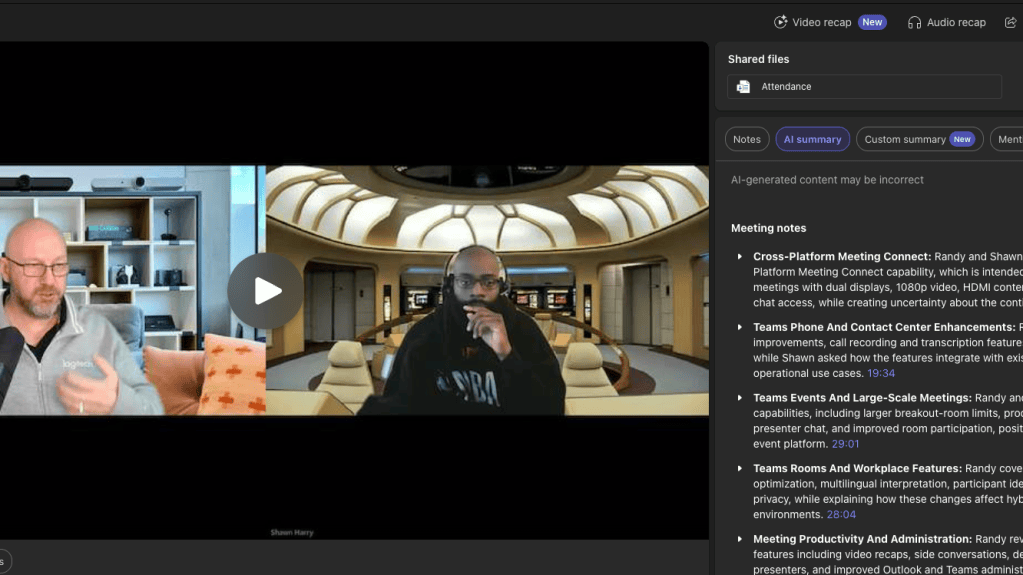
Generated by AI. Make sure to check for accuracy.
Meeting Notes:
- Cross-Platform Meeting Connect: Randy and Shawn discussed Microsoft and Zoom’s planned Cross-Platform Meeting Connect capability, which is intended to improve Teams Rooms participation in Zoom meetings with dual displays, 1080p video, HDMI content sharing, synchronized controls, and limited chat access, while creating uncertainty about the continuing role of CVI providers.
- Planned Capabilities: Randy explained that Cross-Platform Meeting Connect extends the current third-party meeting experience from Teams Rooms. Planned capabilities include dual-screen layouts, 1080p video, HDMI content ingest, synchronized room controls such as mute, unmute, and end call, and read-only chat visibility. The capability is initially described for Teams-to-Zoom and Zoom-to-Teams scenarios, with support for additional platforms not yet confirmed.
- CVI Comparison: Shawn questioned whether customers and integrators will know when to use Direct Guest Join or CVI. Randy confirmed that the new capability is available with Teams Rooms Pro licensing, whereas SIP-based CVI requires a CVI provider and associated cost. Shawn noted that SIP remains a more mature and extensible protocol, while Direct Guest Join is easier to use because it is built in.
- Microsoft And Zoom Scope: Randy stated that the announcement focuses on Microsoft and Zoom and does not clearly explain whether the implementation uses WebRTC, SIP, or a new mechanism. Zoom supports SIP, and Shawn confirmed that other platforms such as Webex also support it, but the future experience for Google and other services remains unclear.
- CVI Provider Impact: Randy described Pexip as a cross-platform option that can connect Teams Rooms, Zoom Rooms, and Google Rooms and provide mixed-estate management, telemetry, and device registration. Shawn and Randy agreed that Microsoft’s enhanced native capability could compete with Pexip for some use cases, although CVI still offers broader interoperability and additional management capabilities.
- Expected Timing: Randy said the capability is expected around the following summer and described it as an evolving story that should be followed through future demonstrations and documentation. Shawn identified this as the feature area they most wanted to monitor, while both participants acknowledged that the available information is not yet sufficient for firm technical conclusions.
- Teams Phone And Contact Center Enhancements: Randy reviewed Teams Phone Agent, queues-app improvements, call recording and transcription features, delegation controls, and call-history changes, while Shawn asked how the features integrate with existing call queues and identified potential operational use cases.
- Teams Phone Agent: Randy said Teams Phone Agent is generally available as an AI-powered receptionist supporting approximately 60 languages. It can answer routine questions, book appointments, and escalate calls to people, groups, queues, or other destinations according to configured rules. In response to Shawn’s question about whether it is built into call queues or auto attendants, Randy explained that it can route callers to a person, call group, ring group, queue, or other starting point.
- Queues App Recaps: Randy described intelligent call recap in the queues app, including Copilot-supported shared call history and post-call insights. The queues app continues to develop toward a lightweight contact-center experience and can expose call information to support follow-up and operational review.
- Automatic Recording: Randy explained that call queues can automatically record and transcribe calls, with recordings stored in SharePoint and accessible through call recaps. This is not positioned as compliance recording; Shawn noted that it may suit organizations without specific compliance or regulatory requirements. Randy also said that Graph or similar APIs could enable organizations to move call information into CRM systems.
- Recording Notifications: Randy said Teams will allow organizations to customize recording and transcription notifications instead of relying on the previous fixed wording. This addresses situations where organizations need to include their own wording, links, terms, or policy information in the notification.
- Delegation Controls: Randy described enhanced controls for delegated calls, including the ability for a delegator to lock an active call, prevent a delegate from joining or resuming it, and enable warning tones when a delegate joins or resumes. Shawn said the feature could apply where an organization needs this level of granular control, including certain compliance-related scenarios.
- Call History Expansion: Randy explained that the Teams Calls app will consolidate missed calls and related voicemails into a single history event and expand retention from 100 records to as many as 3,000 records or six months, whichever comes first. Separate history, voicemail, and recording tabs will also be available for multiple lines. Shawn noted that the expanded history is useful, although organizations with high call volumes may still need a call-detail-record warehouse.
- Teams Events And Large-Scale Meetings: Randy and Shawn reviewed expanded Teams Events capabilities, including larger breakout-room limits, production controls, custom layouts, NDI sources, presenter chat, and improved room participation, positioning Teams as a more capable webinar and event platform.
- Breakout-Room Scale: Randy said Teams Events breakout rooms will support up to 1,000 participants across 100 rooms, increased from 300 participants across 50 rooms. Shawn compared this with earlier Skype for Business limits and noted the substantial increase in supported event scale.
- Production Controls: Randy described controls that allow organizers to specify who can operate production tools, including external participants and speakers. Additional presenter-visibility and layout controls allow producers to manage which video, content, and presenter elements are visible during an event.
- NDI Integration: Randy said event producers will be able to select and stream up to eight NDI sources during meetings and events. This supports professional cameras, OBS Studio, Blackmagic equipment, and other production workflows alongside Teams Rooms, dial-in users, and RTMP sources. Shawn confirmed that NDI is already available in the Teams client and has been used for event production scenarios.
- Room Presenter Chat: Randy explained that Teams Rooms on Android will support chat specifically for event organizers and presenters. This allows production staff to send operational messages such as time reminders to people in the room without relying on the general meeting chat.
- Branding And Layouts: Randy described custom backgrounds for town halls, improved shared-content layouts, and additional management of video panes and presenter areas. These changes allow organizations to apply branding and create more structured event presentations.
- Teams Rooms And Workplace Features: Randy covered improvements to Teams Rooms, room optimization, multilingual interpretation, participant identification, desk experiences, and meeting privacy, while explaining how these changes affect hybrid meetings and shared workplace environments.
- Room Optimization Mode: Randy described a new Teams desktop room-optimization mode for bring-your-own-device scenarios. When a laptop connects to a third-party display or room system, Teams can move the meeting stage to the front-of-room display while keeping the laptop view separate, reducing the risk that private chats or unrelated content appear on the shared screen.
- Multilingual Interpretation: Randy said the Interpreter Agent will support Teams Rooms on Android and described room-scale interpretation in which different seating areas hear different languages through localized speaker coverage. In response to Shawn’s question about audio bleed between areas, Randy clarified that the directional system can deliver English in one part of the room and French or another language in another part.
- Participant Identification: Randy described Express Face enrollment, expected in November, which allows users to opt in to create a face profile before eligible meetings. Supported Teams Rooms can then identify room participants and improve downstream meeting experiences such as Copilot and recaps. IntelliFrame people labels are also being developed for room participants, with one related release moved to late January.
- IntelliFrame Control: Randy explained that Microsoft will retire the option for online participants to turn off Cloud IntelliFrame when a Teams Room uses it. Cloud IntelliFrame processes room camera streams in the meeting service to create individual participant frames and labels; once the change takes effect, remote participants will receive that processed view rather than choosing the raw camera stream.
- Desk Experience: Randy described new Teams desk-hub devices that combine a docking-station-style unit, display, USB ports, and a desk experience connected to Microsoft Places and desk booking. Each device requires a shared-space license, and the feature is intended to participate in broader workplace systems covering desks, rooms, visitors, parking, and related resources.
- Privacy Controls: Randy noted that Teams Panels will support hiding organizer names in calendar views in addition to hiding meeting subjects. This can reduce disclosure of sensitive meeting context in shared or public areas.
- Meeting Productivity And Administration: Randy reviewed new meeting controls and workflow features including video recaps, side conversations, default templates, recording consent, simultaneous presenters, and improved Outlook and Teams administration.
- Video Recaps: Randy explained that Teams recaps can now produce a video-oriented recap that combines meeting-video excerpts with generated summary content. Existing recap capabilities already use meeting transcripts and can produce spoken-word or podcast-style summaries, with translation support covering multiple languages and regional variants.
- Meeting Side Conversations: Randy said users will be able to start or continue private side conversations from within meeting chat while preserving the conversation history. Unlike an inline reply mode, the Teams experience opens a separate chat tab beside the meeting stage, allowing multiple side conversations to coexist with the main meeting chat.
- Default Meeting Templates: Randy described administrator-created default meeting templates that can be pushed to users. Templates can standardize settings such as transcription, recording, meeting access, and room-related controls so users do not need to configure the same options manually for every meeting.
- Recording Consent: Randy said one-to-one PSTN calls will support explicit consent for recording and transcription. The expected interaction may use an audio announcement and phone keypad input; participants who decline can remain connected but stay muted and unable to speak.
- Multiple Presenters: Randy and Shawn discussed support for two presenters sharing a screen or window simultaneously in a Teams meeting. The content appears in separate panes, supporting use cases such as displaying notes alongside a diagram or enabling trainers to present multiple materials at once.
- Outlook For Mac: Randy said Teams meeting options will be available directly in Outlook for Mac when scheduling a meeting, removing the need to open Teams separately to adjust those settings. They also noted that new Outlook has improved interface alignment with Outlook on the web, although Shawn said legacy COM add-ins and accumulated technical debt continue to delay adoption for some organizations.
- Copilot And Agentic AI Adoption: Randy and Shawn discussed Copilot’s use in preparing the episode and Microsoft’s growing AI feature set, but both said they currently use little agentic AI because reliable, specific, and trustworthy use cases remain limited in their work.
- Copilot Content Preparation: Randy used Copilot in the Message Center, roadmap, email, and “What’s New” content to assemble the episode materials. Copilot categorized items and organized information effectively, but Randy still had to copy, paste, edit, remove content, and refine the results. They planned to include the full notes in the accompanying blog post.
- Limited Daily Use: When Randy asked about day-to-day agentic AI usage, Shawn said they use virtually none because their current work does not present a strong use case. Shawn said the customer environment similarly uses features such as intelligent recaps but not broader agentic automation.
- Trust And Accuracy: Shawn explained that their architecture work is highly specific and cannot tolerate arbitrary summaries or AI-generated mistakes. They prefer reviewing information directly and producing documentation themselves rather than relying on AI to determine which details matter, especially where an error could affect customer work.
- Use-Case Maturity: Randy and Shawn distinguished between identifying a possible AI use case and incorporating it into daily work. Randy said Copilot can help summarize mail or revise wording, but the value depends on whether it saves enough time to offset review effort. Both concluded that vendor and systems-integrator promotion is outpacing the maturity and strength of practical use cases for their current responsibilities.
- Teams Client And Platform Updates: Randy summarized broader Teams platform updates, including client performance work, meeting scale, call-management improvements, external-bot blocking, and a shift from monthly to quarterly “What’s New” reporting.
- Release Reporting Cadence: Randy said the Teams “What’s New” blog has moved from a monthly to a quarterly cadence. The first combined installment covered August and September, and the next installment is expected to cover October through December.
- Client Performance: Randy noted that Microsoft continues to improve Teams client responsiveness and reliability. They also observed that Teams Rooms still has demanding hardware requirements, including a reported 32 GB RAM requirement for the room application.
- External Bot Blocking: Randy described a capability to automatically block identified external meeting bots, with administrative controls for exceptions. The change addresses third-party bots that join meetings to listen, transcribe, or process meeting content without being expected by participants.
- Meeting Scale: Randy highlighted continued expansion of Teams meeting and event scale, including support for very large meetings and more extensive production controls. They said these capabilities reduce the need for organizations to rely on separate webinar or streaming platforms for some scenarios.
Follow-up tasks:
- Podcast Follow-Up Content: Add the discussed Teams updates and links to the accompanying podcast blog post and email. (Randy)
- Cross-Platform Meeting Connect: Monitor Microsoft and Zoom’s Cross-Platform Meeting Connect development, including supported platforms, feature scope, and expected summer release timing, and revisit its implications for Direct Guest Join and CVI. (Randy, Shawn)
- Teams Phone Agent: Evaluate Teams Phone Agent’s potential use cases and how it integrates with call queues, auto attendants, call groups, and escalation destinations. (Randy, Shawn)
- AI Adoption: Identify a practical, sufficiently reliable Copilot or agentic-AI use case suitable for their day-to-day or customer architecture work before adopting it operationally. (Randy, Shawn)
It was a fun discussion as always. Thanks for listening! Catch you next time.
As always, we’d love to hear your thoughts. Leave a comment below.
You can listen in-line in this post, or if you prefer, Spotify, Apple Podcasts, Amazon Podcasts, TuneIn or iHeartRadio. The links are below. Be sure to bookmark https://ucs.fyi/podcast and subscribe for new episodes




If you’ve enjoyed this or any other episodes of the UCStatus Podcast, why not take a second to subscribe, like and share.
We’d love to hear your comments and suggestions for future episodes so why not leave a comment.
Discover more from
Subscribe to get the latest posts sent to your email.
