

Hello Readers, I hope you’re well.
Welcome to Episode 74 of the UCStatus Podcast. This episode features me (@randychapman), Mark Vale (@markvale) and Shawn Harry (@shawnharry).
Another list of stuff from the Microsoft Teams Roadmap and the Message Centre from late July 2026 to 2nd week of September 2026. Here’s the list…
Roadmap
Additional health signals on MTR on Android
Expanded Pro Management Portal (PMP) health monitoring for Teams Rooms on Android by surfacing device health signals including storage health, Teams meeting app, calendar sync, secondary display health and network. When issues are detected, PMP will automatically generate actionable alerts and support ticket creation workflows, enabling IT administrators to proactively identify and triage room health issues before they impact meeting experiences.
GA date: October CY2026
Proximity Join support for attendees in Teams events from MTR on Windows and Android
Attendees can take advantage of proximity join with Teams Rooms on Windows and/or Android for fast, effortless connection to nearby room systems during Teams events, such as town halls, webinars, and structured meetings.
GA date: October CY2026
Teams Admin Centre – Single pane for monitoring & troubleshooting for meetings and calls across the org
Administrators can monitor meeting and call health across the organization, uncover recurring patterns, and proactively troubleshoot issues impacting users in both active and completed meetings and calls.
GA date: September CY2026
Use Copilot Chat after a call in Call Queues
After a recorded call is completed, use Copilot in the Queues app to quickly catch up on key details, uncover insights, and resolve customer issues faster without having to manually search through a transcript or listen back to a recording. Navigate to the unified call history in the Queues app, select the recorded call record, and launch the Copilot Chat sidecar from within the Recap tab. You can then ask Copilot to generate a summary or answer questions about specific details related to the call.
GA date: September CY2026
Facilitator can join Channel Meetings
Facilitator can now join meetings set up in Teams channels. Facilitator helps participants run more effective meetings through the ability to take live notes, manage the agenda, answer questions, and capture tasks.
GA date: September CY2026
Intelligent Recaps in Queues App
Spend less time catching up on call recordings to resolve customer issues faster. For recorded call queue calls, the Queues app now supports intelligent call recaps for recorded calls that includes AI-generated summary notes, key discussion points, and follow-up actions. Navigate to the call record in the Queues app and select the Recap tab to access.
GA date: September CY2026
Change the organizer of a meeting
Transfer ownership of a meeting or recurring meeting series to another person in your organization. The new organizer must accept the transfer before it is completed. This helps maintain continuity for long-running meetings while preserving the existing event for attendees. Available in Outlook for Windows and web and Teams calendar.
GA date: September CY2026
Breakout rooms support for Teams Rooms on Android
With breakout room support, Teams Rooms on Android can be added to a breakout room and moved in and out of the main room making it easy for breakout session coordination.
GA date: October CY2026
Coordinated meetings support for MTR on Android
Teams Rooms on Android now supports coordinated meetings, enabling paired Teams Rooms on Android devices and Android-based touch boards to work together in the same hybrid meeting experience. This feature enables coordinated join and leave, and collaboration across front-of-room displays and touch boards. This creates more immersive and flexible meeting spaces for both in-room and remote participants.
GA date: January CY2027
Hide the organizer name in the calendar on Teams Panel and MTRoA
Admins can now choose whether the organizer name will show up in the calendar view on Teams panels and MTR-Android. In Pro Management Portal, admins can toggle the “Show Organizer Name” setting ON or OFF. On the panel device, admins can toggle the “Show organizer names” setting ON or OFF. On the MTRA console device and All In One Display device, admins can toggle the “Show organizer names on calendar” setting ON or OFF. Based on the selection, the organizer name will or will not be shown on the calendar view on panel and MTRA devices. Available with Teams Rooms Pro and Shared Space licenses.
GA date: October CY2026
QR code protection in Teams Meetings
Microsoft Teams will provide additional protection for QR codes shared by external users in messages. Images containing QR codes from external senders will be obscured by default and require users to reveal them before viewing or scanning. This helps reduce the risk of phishing and fraud by encouraging more deliberate interaction with QR code content.
GA date: October CY2026
Message Centre
Transitioning Teams Android Device Management from Teams admin Center to the Teams Rooms Pro Management portal
Teams Android device management is transitioning from the Teams admin center to the Teams Rooms Pro Management portal by July 2026 (public cloud) and August-September 2026 (GCC environments). PMP will unify management for all Teams devices, with TAC device management deprecated by September 2026. Admins should prepare by reviewing updated guidance and updating documentation.
GA now
Migrate shared Teams devices to passwordless Entra resource accounts
Microsoft Teams is introducing a new migration experience in the Teams Rooms Pro Management portal to move shared device accounts to passwordless Microsoft Entra resource accounts. This improves security by using device-bound credentials. Admins must initiate migration, starting early August 2026, with recommended phased deployment and validation.
GA now
Teams shared display mode and peripheral detection for BYOD spaces
Microsoft Teams is introducing shared display mode and enhanced peripheral detection for BYOD meeting spaces to improve meeting join experience and privacy. Rollout begins late July 2026. Administrators gain new reporting and device health insights in Teams Pro Management portal, with options to opt out of data collection. Users can disable automatic meeting room mode.
Completed mid-August
Modernized Gallery view in Teams Rooms on Android
Microsoft Teams Rooms on Android will receive a modernized Gallery view in mid-August 2026, aligning it with Windows. Updates include consistent participant tile ratios, video prioritization, stable gallery behavior, and new admin controls. No action is required before rollout; admins can configure settings post-update.
Mid August for general
mid-September for GCC
Interpreter agent support in Teams Rooms on Android
Microsoft Teams Rooms on Android will support real-time Interpreter agent for up to nine languages, enabling multilingual meetings with voice simulation. Available late August 2026, it requires a Teams Rooms Pro license, includes 20 hours of interpretation monthly, and offers admin controls via Teams meeting policies. No action required.
Available late September
Human interpreter listening mode supported in Teams Rooms on Windows
Microsoft Teams Rooms on Windows with Teams Rooms Pro will support human interpreter listening mode starting July 2026, allowing participants to select and switch interpretation languages during meetings. The feature enhances multilingual collaboration, requires organizer enablement, and involves no admin action.
Available late August
Microsoft Teams Rooms on Android: room users can change the app language
Teams Rooms on Android will allow users to temporarily change the app language per session from the console, aligning with Windows experience. This feature rolls out from June to October 2026 with app version 2.12.0+, resets after restart, requires no admin action, and does not affect system settings.
Available late October
Enhanced IntelliFrame with AI data channel for intelligent cameras
Microsoft Teams is enhancing IntelliFrame for Teams Rooms on Windows with AI data channels on certified cameras, enabling faster speaker framing, participant recognition, and smoother views. Rolling out worldwide from mid-October to mid-November 2026, this feature is enabled by default and requires no admin action.
Available mid November
Recap app consolidates meeting recaps in one place
The Microsoft Teams Recap app, rolling out July–August 2026, centralizes meeting recordings, transcripts, and AI summaries for improved productivity. It offers filters, audio/video recaps, and access to past 30 days’ meetings. AI features require a Microsoft 365 Copilot license; the app is pre-installed but not pinned by default.
Available end of August
Enhanced bookable desk experience with Teams panel based desk devices
Microsoft Teams is enhancing the bookable desk experience on Teams panel-based devices like Logi Dock Flex, enabling users to view and reserve desks directly. Rollout starts early August 2026, requiring a Teams Shared Space license per device. No admin action is needed; users must connect their laptop to book desks.
Available late August
Digital signage support for Teams panels
Microsoft Teams will support digital signage on idle Teams panels starting early August 2026, configurable via the Teams Rooms Pro Management portal. This feature works with select third-party providers (Appspace, XOGO) and requires Teams Rooms Pro or Shared Spaces licenses, allowing tenant-wide or device-specific settings.
Available late August
Use multiple phone lines on Teams mobile
Microsoft Teams Phone will support managing multiple phone lines on the Teams mobile app starting late July 2026, completing by August end. Users can select lines for calls, return calls by line, and view unified call history. No action is required; admins may manage numbers post-rollout.
Available late August
New user setting to view incoming calls in a small window
Microsoft Teams will introduce a new default setting allowing users to view incoming calls in a small, resizable window to reduce disruptions. This feature will roll out from May 2025 to mid-September 2026 across all platforms, requiring no admin action but user notification is recommended.
Available mid September
Call Quality Dashboard Custom Detailed Reports
Call Quality Dashboard will get a refreshed interface with enhanced accessibility and features like dark mode. Public preview starts mid-August 2026; general availability begins early September 2026. No action is needed, and users can revert to the old experience during rollout.
Available late September
AI-powered notes for in-person meetings with Facilitator in Teams Rooms
Microsoft Teams is expanding AI-powered meeting notes with the Facilitator agent to Teams Rooms on Windows and Android, enabling real-time notes during in-person meetings. Notes are securely stored in tenant-owned SharePoint, accessible via meeting recap in Teams desktop. Rollout begins late October 2026, requiring Teams Rooms Pro licensing and specific tenant settings.
Available late October
Breakout rooms now supported in meetings with up to 1,000 attendees
Microsoft Teams now supports breakout rooms in meetings with up to 1,000 attendees, allowing up to 100 breakout rooms per meeting. This feature, enabled by default, removes the previous 300-attendee limit and will roll out from July to September 2026. No action is required.
Available late September
Enhanced issue detection in Teams Rooms on Windows and auto-remediation with Teams Rooms Pro Management
Teams Rooms on Windows with Teams Rooms Pro will have enhanced issue detection and automatic remediation during nightly reboots, reducing downtime. Unresolved issues generate support tickets in the Pro Management portal. This feature is enabled by default starting mid-May 2026, with admins able to adjust settings as needed.
Available late September
Local Pan-tilt-zoom (PTZ) controls for Microsoft Teams Rooms on Windows
This one has been in the Message Centre for over two years at this point.
Microsoft Teams Rooms on Windows will add native local Pan-Tilt-Zoom (PTZ) camera controls for compatible cameras, allowing users to adjust cameras directly from the room console. Rollout begins September 2026, with no action required. Administrators should inform users and update support materials accordingly.
Available mid October
Copilot Recap
Back by popular demand. Keep in mind that this was generated by AI and may not capture exactly what we said or the sentimenmt and context around it accurately.
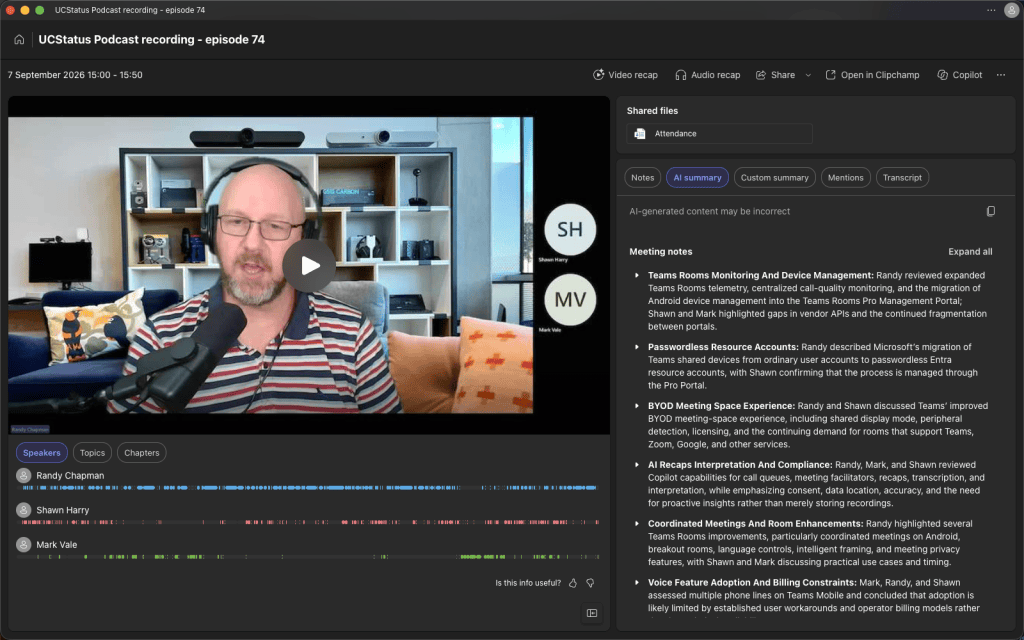
Generated by AI. Make sure to check for accuracy.
Meeting Notes:
- Teams Rooms Monitoring And Device Management: Randy reviewed expanded Teams Rooms telemetry, centralized call-quality monitoring, and the migration of Android device management into the Teams Rooms Pro Management Portal; Shawn and Mark highlighted gaps in vendor APIs and the continued fragmentation between portals.
- Expanded Health Signals: Randy explained that additional health signals for Teams Rooms on Android include Teams application status, calendar synchronization, secondary displays, and network information. Shawn asked whether vendors can retrieve this telemetry through an API; Randy answered that they currently cannot and noted that the available data remains incomplete.
- Peripheral Visibility Gaps: Randy gave external microphone pods as an example of missing telemetry: if a pod is disconnected, Teams Admin Center and the Pro Management Portal may still report that audio is present rather than identifying the disconnected component. Randy said Microsoft needs to expose more device or vendor API data before a genuine single-pane monitoring experience is available.
- Portal Separation: Shawn questioned whether administrators will need to switch between the Pro Management Portal for device information and Teams Admin Center for call telemetry. Randy and Mark clarified that calls are associated with the signed-in user rather than the physical device, but the discussion concluded that the experience remains split across administrative tools.
- Pro Portal Migration: Randy said Android device management is moving from Teams Admin Center to the Teams Rooms Pro Management Portal and that individual and bulk settings, update management, and ring management are available. Some functions, such as uploading user backdrops, were still pending.
- Automated Remediation: Randy described enhanced issue detection and automatic remediation for Teams Rooms on Windows with Teams Rooms Pro. During nightly reboots, the service can address certain software issues, while unresolved problems can generate support tickets in the Pro Portal; it cannot physically reconnect removed USB cables or displays.
- Passwordless Resource Accounts: Randy described Microsoft’s migration of Teams shared devices from ordinary user accounts to passwordless Entra resource accounts, with Shawn confirming that the process is managed through the Pro Portal.
- Account Model Change: Randy explained that Teams Rooms, panels, phones, and other shared devices have historically used user accounts even though they are resources rather than people. Microsoft is migrating these accounts to resource accounts and allowing their passwords to be removed.
- Provisioning Codes: The planned end state will allow administrators to provision a resource account in the back end and generate a code that an installer enters on the device to associate it with the account. Randy said this provisioning-code capability was not fully available yet and still required additional updates.
- Administrative Controls: Randy said the migration and account controls are located in the Pro Management Portal, require appropriate role-based access control, and apply to shared devices rather than ordinary Teams policy administration.
- BYOD Meeting Space Experience: Randy and Shawn discussed Teams’ improved BYOD meeting-space experience, including shared display mode, peripheral detection, licensing, and the continuing demand for rooms that support Teams, Zoom, Google, and other services.
- Shared Display Mode: Randy described a mode for non-Teams rooms where a user connects a laptop or other device to a USB and display setup, then uses the room’s camera, microphone, speakers, and display. Administrative controls can automatically detect a BYOD space and present a split-screen experience with the meeting on the room display while chat and other applications remain on the user device.
- Connectivity And Usability: Randy said a properly designed BYOD room can operate through a single cable using DisplayPort Alt Mode without requiring drivers. Users can connect compatible phones, tablets, Macs, Windows PCs, Linux systems, or Chrome OS devices, use the room peripherals, and disconnect when finished so the space returns to its idle state.
- Licensing And Management: The enhanced BYOD experience provides health signals and management data in the Pro Portal but requires the applicable shared-device or shared-spaces license. Randy noted that Microsoft’s naming for these licenses has changed several times.
- Mixed Deployment Models: Randy said organizations are deploying mixed environments: some use Teams Rooms for important or complex rooms and BYOD for booths and smaller spaces, while others deploy both Teams Rooms and BYOD across different room sizes. Shawn agreed that the appropriate choice depends on the use case and the organization’s mix of collaboration services.
- Room Booking: Randy recommended giving BYOD spaces resource accounts and panels so they remain bookable and visible to users even when they are not Teams Rooms. They also recommended making joining straightforward; Shawn specifically preferred native Teams panels where appropriate.
- AI Recaps Interpretation And Compliance: Randy, Mark, and Shawn reviewed Copilot capabilities for call queues, meeting facilitators, recaps, transcription, and interpretation, while emphasizing consent, data location, accuracy, and the need for proactive insights rather than merely storing recordings.
- Call Queue Copilot: Randy described Copilot chat after call-queue calls, including call summaries and transcript queries. Mark said their environment still appeared to require a third-party call recorder, and Randy responded that the capability might still be rolling out; Mark planned to wait several more weeks.
- Proactive Data Use: Mark questioned whether Microsoft’s growing collection of recordings, transcripts, and recaps is accompanied by tools that proactively identify issues. They said managers are unlikely to listen to recordings or read transcripts manually and instead need alerts when a significant event occurs.
- Data Governance: Mark and Shawn said the main concern with third-party note-taking bots is not necessarily the meeting participant but the provider, storage location, and potential use of the data outside the organization. Randy noted that administrators can block external bots and recorders across meetings, with limited role-based override options.
- Consent And Accuracy: Randy asked whether external callers must be told that a bot is transcribing a call. Mark answered that consent requirements would likely follow existing call-recording rules in jurisdictions where consent is required. They also noted that transcripts can lose context and that summaries should not automatically be treated as authoritative records for disputes or legal use.
- Interpretation Features: Randy described real-time interpretation that can translate spoken language while preserving the speaker’s voice characteristics, supporting up to nine languages and 20 hours of interpretation per month with a Pro license. They said the feature is intended for multilingual collaboration and asked whether it could support town halls or events; Randy indicated that it likely applies beyond standard meetings, although the exact event support was not explicit.
- Human Interpretation Mode: Randy explained that human interpreter listening mode for Teams Rooms on Windows and Android lets participants select or switch interpretation languages during a meeting. The organizer must enable the feature, while no separate administrator action is required.
- Facilitator Expansion: Facilitator support is being extended to channel meetings and scheduled in-person Teams Rooms meetings. Randy said Facilitator will be able to take notes for a scheduled room meeting when invoked, with the in-person capability expected later in the year.
- Coordinated Meetings And Room Enhancements: Randy highlighted several Teams Rooms improvements, particularly coordinated meetings on Android, breakout rooms, language controls, intelligent framing, and meeting privacy features, with Shawn and Mark discussing practical use cases and timing.
- Android Coordinated Meetings: Randy explained that coordinated meetings allow a primary Teams Room and a second device, such as a touch display or another Teams Room, to join the same meeting through linked accounts and back-end configuration. The capability has existed on Windows but is planned for Teams Rooms on Android, enabling vendor touchboards from providers such as Logitech, Yealink, and Cisco to participate; the stated target was January 2027.
- Breakout Room Scale: Teams meetings are being expanded to support up to 1,000 attendees and as many as 100 breakout rooms, removing the previous 300-attendee limit. Randy said the rollout was scheduled from July through September.
- Room Language Selection: Starting with the relevant Teams Rooms on Android app version, users will be able to select a temporary interface language from within the Teams application. The selected language applies during the meeting and reverts to the default language afterward, unlike the permanent language configuration available on Windows.
- Intelligent Framing: Randy described enhanced intelligent framing for certified cameras, including faster speaker framing, participant recognition, smoother views, and labels over individuals in group framing. The AI data-channel enhancement was expected in mid-November.
- Meeting Privacy: Randy said Teams will obscure images containing QR codes sent by external users until the recipient explicitly reveals them, reducing the risk of scanning malicious or misleading codes. They also discussed a control to hide meeting subjects and organizer names on Teams panels and Android Teams Rooms to avoid exposing sensitive meeting information.
- Voice Feature Adoption And Billing Constraints: Mark, Randy, and Shawn assessed multiple phone lines on Teams Mobile and concluded that adoption is likely limited by established user workarounds and operator billing models rather than by technical availability.
- Multiple Phone Lines: Randy said multiple phone lines on Teams Mobile had moved from the roadmap into the Message Center and was expected around late August. Mark estimated that among approximately 50,000 Teams Phone users, the feature was currently used essentially zero times.
- Operator Billing: Mark explained that many Operator Connect providers price service per user and per line, so assigning two numbers to one person can require an additional subscription even when the user’s minutes and usage do not increase. Supporting more flexible relationships between users, numbers, shared lines, and direct inward dialing would require providers to rework their billing and infrastructure.
- Adoption Barrier: Mark said providers are unlikely to redesign systems unless a sufficiently large customer makes support a commercial requirement. The participants also noted that unassigned numbers, shared lines, and existing messaging applications can cover many of the same use cases, reducing demand for multiple mobile lines.
- Incoming Call Window: Randy mentioned an upcoming Teams setting that displays incoming calls in a smaller window with additional controls rather than using a large call interface. The feature was expected around mid-September.
- Call Quality Dashboard Usability: Randy announced a refreshed Call Quality Dashboard with accessibility improvements and dark mode, while Mark and Shawn argued that the underlying data remains difficult to interpret and often drives organizations toward third-party monitoring tools.
- Dashboard Refresh: Randy said the Call Quality Dashboard would receive a refreshed interface, improved accessibility, and dark mode, with the update expected around mid-August.
- Interpretation Difficulty: Mark explained that setting up CQD can be complex and that administrators must understand what its metrics mean before the charts provide actionable information. Shawn said the native graphs have historically been difficult to use, while Randy noted that third-party products often present the same data more effectively.
- Operational Value: The participants said customers may request CQD for business continuity or service-level documentation but later discover that maintaining and interpreting it is labor-intensive. They also observed that many users now rely on messaging and alternative communication services, reducing the perceived urgency of diagnosing individual voice-call quality problems.
- Teams Panel And Workplace Display Features: Randy covered digital signage and bookable-desk capabilities on Teams panels, while Shawn and Randy discussed practical uses, licensing, proximity behavior, and the potential energy cost of keeping displays active.
- Bookable Desk Devices: Randy described Teams panel-based desk devices such as the Logitech Dock Flex and a Yealink device, which combine a docking station with a front-facing display. These devices integrate with Places in the back end and require a shared-device license for authentication.
- Digital Signage: Digital signage is being extended to Teams panels, allowing organizations to display information such as in-meeting collateral, joining instructions, or other workplace content. Shawn considered the feature more useful in rooms than on every panel.
- Power Management: Shawn asked whether local power-saving settings or proximity sensors could control panel activity. Randy said some panels can wake from sleep using proximity detection, but Teams behavior can be inconsistent, and it was not yet clear whether digital signage would override sleep settings.
- Delayed Camera Controls: Randy revisited local pan-tilt-zoom controls for Teams Rooms on Windows, noting that the feature has repeatedly slipped and that the Android implementation currently relies on cropping rather than physically moving or optically zooming the camera.
- Windows PTZ Timeline: Randy said local pan-tilt-zoom controls for Teams Rooms on Windows were listed for mid-October, but the feature has appeared in planning materials for roughly two years and has repeatedly been postponed. They expressed uncertainty that the latest date would be met.
- Android Limitation: Randy explained that the existing Android capability is limited because it crops the static camera image rather than moving the camera or providing optical zoom. The group is waiting to see whether the Windows version delivers more complete camera control.
Follow-up tasks
- Podcast Branding: Update the podcast branding and replace the outdated “UC status” label with a current name such as “AI status” or another agreed title. (Randy)
- Copilot Notes: Review and verify Copilot-generated notes before copying them into the podcast blog post. (Randy)
- Telemetry Integration: Request or identify an API that allows vendors to retrieve Teams Rooms Pro health telemetry, including detailed peripheral status such as disconnected microphone pods. (Mark)
- Call Queue Copilot: Recheck whether Copilot chat, call summaries, and transcript queries are available in call queues without requiring third-party call recording, and follow up after the rollout completes. (Mark)
- Meeting Recording Compliance: Confirm the consent, data-residency, and compliance requirements for using internal or third-party bots, recorders, transcripts, and recaps in calls and meetings. (The team)
- Teams Rooms Management: Evaluate the migration of Teams on Android device management into the Teams Rooms Pro Management Portal and identify any remaining settings that still require another portal, including background-image configuration. (The team)
- Passwordless Resource Accounts: Track the rollout of passwordless Entra resource accounts and provisioning-code sign-in for Teams shared devices, and validate the required RBAC configuration when available. (The team)
- BYOD Room Deployment: Assess BYOD meeting-space requirements, including shared-display mode, peripheral detection, shared-space licensing, and room booking, before deploying or standardizing the experience. (The team)
- Digital Signage Power Management: Verify whether Teams panel digital signage overrides sleep or power-saving settings and define an appropriate proximity- or inactivity-based policy. (The team)
- Multiple Mobile Lines: Assess customer and operator demand, billing implications, and commercial feasibility before pursuing wider adoption of multiple phone lines on Teams Mobile. (Mark)
- Call Quality Reporting: Determine whether the refreshed Call Quality Dashboard provides actionable troubleshooting data or whether a third-party reporting solution remains necessary. (The team)
It was a fun discussion as always. Thanks for listening! Catch you next time.
As always, we’d love to hear your thoughts. Leave a comment below.
You can listen in-line in this post, or if you prefer, Spotify, Apple Podcasts, Amazon Podcasts, TuneIn or iHeartRadio. The links are below.




If you’ve enjoyed this or any other episodes of the UCStatus Podcast, why not take a second to subscribe, like and share.
We’d love to hear your comments and suggestions for future episodes so why not leave a comment.
Discover more from
Subscribe to get the latest posts sent to your email.
