

Hello Readers, I hope you’re well.
Welcome to Episode 73 of the UCStatus Podcast. This episode features me (@randychapman), Mark Vale (@markvale) and Shawn Harry (@shawnharry).
A shorter one this time with a list of stuff from the Microsoft Teams Roadmap and the Message Centre, plus something special for the Pro Management Portal. Here’s the list…
Roadmap
Enhanced issue detection in Teams Rooms on Windows and auto-remediation with Teams Rooms Pro Management
MC1248392 | July 14 – Teams Rooms on Windows with Teams Rooms Pro will have enhanced issue detection and automatic remediation during nightly reboots, reducing downtime. Unresolved issues generate support tickets in the Pro Management portal. The rollout begins mid-May 2026 worldwide, with diagnostics enabled by default and optional admin controls. No action required.
Building‑level insights on the Teams Rooms Pro Management portal recommended actions page
MC1257308 | July 14 – Microsoft is adding building-level insights to the Teams Rooms Pro Management portal’s recommended actions page, highlighting buildings with high Teams Rooms usage and remaining BYOD rooms. Rolling out mid-June to end July 2026, this feature helps IT admins optimize room technology and improve user experience, enabled by default for eligible licenses.
Multilingual Recap available with translation button
After meeting recap is automatically generated in the translation language chosen during the meeting, users can continue to change the language of the meeting recap after its generated.
GA date: August CY2026
Modernized Gallery view in Teams Rooms on Android
The updated Gallery view in Teams Rooms on Android prioritizes video on the meeting stage, arranges participants in consistent aspect ratios, and minimizes movement of participant tiles on stage. Users can hide the room self-preview video and choose to see audio and video participants equally on stage, instead of prioritizing video participants. Admins can choose the default behavior using local device settings and the Pro Management portal.
GA date: July CY2026
Multi-line calling on Teams Mobile
Make and receive calls using multiple assigned phone numbers directly from your mobile device – choose the right line for every call, with unified call history and seamless switching across all your lines.
GA date: July CY2026
Teams Phone call transfer improvements
Microsoft Teams is improving the call transfer experience on desktop (Windows and Mac) with a streamlined workflow that makes transferring calls faster and more intuitive. These changes reduce the number of steps to initiate a transfer and introduce transfer suggestions to help users find the right transfer target more quickly.
GA date: June CY2026
Message Centre
New layout for sharing content in Teams events
Microsoft Teams is introducing an updated set of layout options for presenters using the “Manage what attendees see” experience in Teams events. This update includes a new Speaker focused layout, giving organizers the ability to prioritizes presenter videos alongside shared content. This improvement help deliver more engaging and polished events such as town halls and large broadcasts.
This message is associated with Microsoft 365 Roadmap ID 564613.
Identify in-room participants with IntelliFrame people labels
We’re introducing IntelliFrame people labels in Microsoft Teams Rooms on Windows to improve meeting clarity and inclusivity for remote participants. When enabled, this feature identifies in-room participants by name and displays a contact card, helping remote attendees easily recognize speakers and follow conversations. This enhancement supports better hybrid meeting experiences by connecting in-room and remote participants more effectively, improving collaboration and productivity.
This message is associated with Microsoft 365 Roadmap ID 566700.
Migrate shared Teams devices to passwordless Entra resource accounts
We’re introducing phase 1 of the passwordless Entra Resource Accounts modernization initiative for Microsoft Teams shared devices. This update adds a new account migration experience in the Teams Rooms Pro Management portal that enables admins to identify, schedule, and execute bulk migrations of existing room resource accounts to passwordless Microsoft Entra resource accounts.
Passwordless Entra resource accounts improve security by reducing reliance on stored usernames and passwords while helping increase sign in resilience through secure device-bound credentials. The migration process is initiated by an administrator and will not occur automatically without administrative approval.
This message is associated with Microsoft 365 Roadmap ID 558853.
Pro Management Portal
New Online Room Configurator Beta
Management portal Convergence
Device management for Rooms, Panel and Phones (including SIP phones and devices) moving to PMP. This is now GA as of end of June. Still a phased approach
- Phase 1 (Until May 2026)- Preparation and Early Guidance
- Admin onboarding guidance available.
- Ongoing updates on Android features in PMP and roadmap progress.
- Phase 2 (End of June 2026)- Transition Begins <— we are here
- Android device management capabilities start appearing in PMP.
- Select device management workflows begin redirecting from TAC to PMP.
- Continued feature rollout and enablement.
- Phase 3 (July and Aug 2026)- Expanded Capability and Default Experience
- Full management workflows available in PMP (July 2026).
- TAC workflows increasingly redirected to PMP (Aug 2026).
- Customer migration completed.
- Formal deprecation notices issued.
- Phase 4 (Sept 2026)- Decommissioning the overlapping Teams device management features in TAC
- Remaining TAC device management workflows retired.
- PMP becomes the primary management portal.
Copilot Recap
Back by popular demand. Keep in mind that this was generated by AI and may not capture exactly what we said or the sentimenmt and context around it accurately.
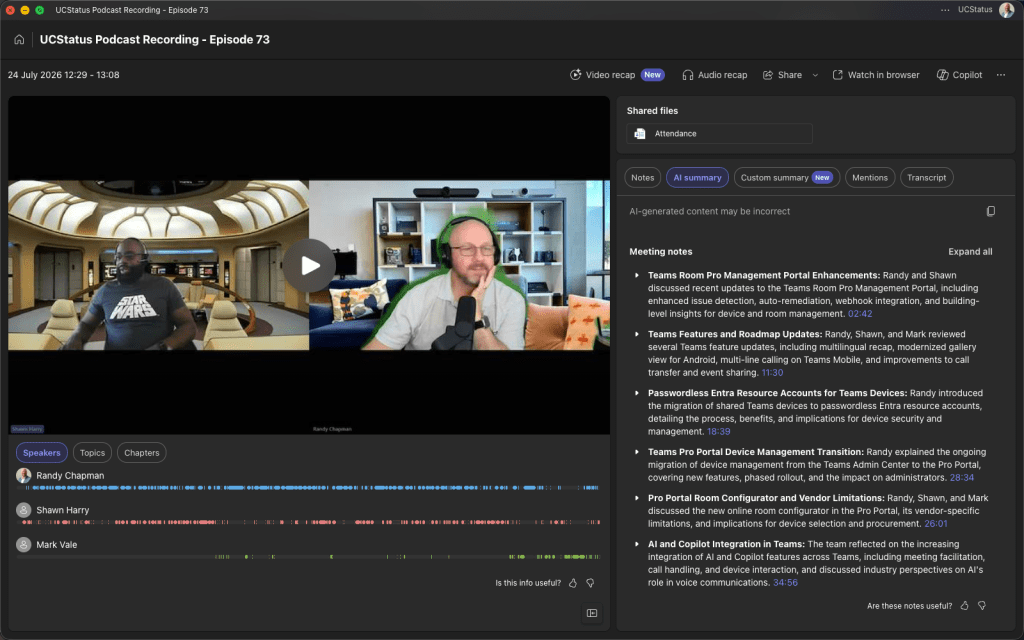
Generated by AI. Make sure to check for accuracy.
Meeting Notes:
- Teams Room Pro Management Portal Enhancements: Randy and Shawn discussed recent updates to the Teams Room Pro Management Portal, including enhanced issue detection, auto-remediation, webhook integration, and building-level insights for device and room management.
- Enhanced Issue Detection: Randy explained that the Pro Management Portal now uses telemetry to detect issues in Teams Rooms, such as screens going offline, and attempts auto-remediation before escalating unresolved issues to support tickets. Integration with ServiceNow and a new webhook feature allows for external notifications and automation.
- Webhook and ServiceNow Integration: The portal supports ServiceNow (Snow) e-bonding and a new webhook feature, enabling integration with ITSM tools or custom agents for automated incident handling. Randy noted that webhook visibility may depend on tenant configuration and that it is not yet clear if the feature is generally available.
- Alert Tuning and Notification Suppression: Shawn and Randy discussed the importance of tuning alert systems to avoid unnecessary notifications, such as those triggered by scheduled reboots or intentional device shutdowns, ensuring only actionable alerts reach support teams.
- Building-Level Insights and Room Recommendations: The portal now provides building-level insights, identifying BYOD (Bring Your Own Device) rooms and recommending upgrades to full Teams Rooms for improved user experience. The system discovers devices based on usage patterns and offers a direct link to a purchasing portal for recommended upgrades.
- BYOD Room Management and Reporting: Randy described how the portal can associate discovered devices with resource accounts and shared spaces licenses, enabling reporting, usage tracking, and device management for BYOD rooms. The team discussed the value of incremental upgrades, such as adding a Teams panel for scheduling and calendar visibility.
- Teams Features and Roadmap Updates: Randy, Shawn, and Mark reviewed several Teams feature updates, including multilingual recap, modernized gallery view for Android, multi-line calling on Teams Mobile, and improvements to call transfer and event sharing.
- Multilingual Recap: Randy highlighted the new translation button for meeting recaps, allowing users to generate summaries in multiple languages and styles, such as executive briefings or podcast formats, enhancing accessibility for non-English speakers.
- Modernized Gallery View: Teams Rooms on Android now feature a modernized gallery view, aligning with the experience previously available on Windows, providing a consistent and improved visual interface for meetings.
- Multi-Line Calling on Mobile: The team discussed the rollout of multi-line calling on Teams Mobile, supporting up to 10 lines per user, which was previously available on desk phones and is now available on mobile clients as of July.
- Call Transfer Improvements: Randy and Shawn noted enhancements to call transfer functionality, making the process more intuitive and faster, with clearer UI elements such as dedicated transfer buttons on touchscreen phones and in the Teams client.
- Event Sharing Panel Overhaul: The sharing panel in Teams events has been redesigned for greater intuitiveness, consolidating options for sharing screens or apps, though sharing a portion of the screen is still not natively supported.
- Passwordless Entra Resource Accounts for Teams Devices: Randy introduced the migration of shared Teams devices to passwordless Entra resource accounts, detailing the process, benefits, and implications for device security and management.
- Migration Process: The Pro Portal now allows administrators to migrate existing Teams device accounts to passwordless authentication, removing the need for traditional passwords and enhancing security.
- Provisioning and OTP Enrollment: For Windows devices, one-time passwords (OTP) are used for provisioning, while Android devices require entry of the MAC address, device name, and location to generate an OTP for on-site installers, enabling secure and remote sign-in.
- Security and Conditional Access: The passwordless approach simplifies security posture by eliminating password-based logins, supporting token-based authentication, and reducing the need for complex conditional access policies, though organizations may still layer additional controls as desired.
- Device Management Implications: Devices can now be remotely signed in via the Pro Portal, and even devices offline for extended periods will refresh their tokens upon reconnecting, streamlining management and reducing administrative overhead.
- Teams Pro Portal Device Management Transition: Randy explained the ongoing migration of device management from the Teams Admin Center to the Pro Portal, covering new features, phased rollout, and the impact on administrators.
- Migration Timeline and Phases: The transition is occurring in four phases, with the current phase involving the migration of device management capabilities to the Pro Portal, formal deprecation notices for the Teams Admin Center, and full decommissioning of overlapping features planned for September.
- Expanded Device Support: The Pro Portal now supports management of Teams Rooms, SIP devices, phones, and panels, with Android devices already included and expanded functionality for individual and bulk configuration.
- Configuration Profiles and Provisioning: Administrators can import and assign configuration profiles in bulk, associate profiles with accounts, and pre-provision devices, though zero-touch provisioning is not yet fully implemented.
- Voice and SBC Management: While endpoints are moving to the Pro Portal, session border controllers (SBCs) and related voice policies remain managed in the Teams Admin Center, leading to a split administrative experience for now.
- Pro Portal Room Configurator and Vendor Limitations: Randy, Shawn, and Mark discussed the new online room configurator in the Pro Portal, its vendor-specific limitations, and implications for device selection and procurement.
- Vendor-Specific Device Listings: The configurator is linked to a specific global reseller, so only devices sold by that reseller are listed, limiting the selection and excluding some certified devices and vendors.
- Adoption and Use Cases: The configurator is off by default and may be more useful for small organizations without AV specialists, but its adoption is limited due to the vendor-specific approach and lack of a fully agnostic device list.
- AI and Copilot Integration in Teams: The team reflected on the increasing integration of AI and Copilot features across Teams, including meeting facilitation, call handling, and device interaction, and discussed industry perspectives on AI’s role in voice communications.
- Copilot Features in Teams: Copilot is now available on phones and in Teams Rooms, offering features such as meeting recap, voice agent assistance, and call queue handling, with further expansion into device and meeting facilitation.
- Industry Discussion on AI and Voice: Mark raised the topic of AI agents communicating over voice channels, with the group debating the practicality and use cases, ultimately suggesting that direct data exchange or federation platforms may be more efficient than voice-based bot interactions.
Follow-up tasks:
- Room Configurator Vendor Limitation: Investigate whether Microsoft plans to make the Pro Portal room configurator vendor-agnostic and address the current limitation to a single reseller. (Randy)
- Pro Portal Adoption: Assess and report on the current adoption rate of the Pro Portal room configurator, especially among smaller organizations without AV specialists. (Randy)
It was a fun discussion as always. Thanks for listening! Catch you next time.
As always, we’d love to hear your thoughts. Leave a comment below.
You can listen in-line in this post, or if you prefer, Spotify, Apple Podcasts, Amazon Podcasts, TuneIn or iHeartRadio. The links are below.




If you’ve enjoyed this or any other episodes of the UCStatus Podcast, why not take a second to subscribe, like and share.
We’d love to hear your comments and suggestions for future episodes so why not leave a comment.
Discover more from
Subscribe to get the latest posts sent to your email.
